
Doppler effect
Doppler effect on the board: see the waves bunch up and hear the pitch change
Set the tone and the speed. The source, a car or an airplane, moves across the board with the waves close together ahead and far apart behind. Two listeners show the frequency they hear, and with Listen the class hears the pitch drop as the source goes by.
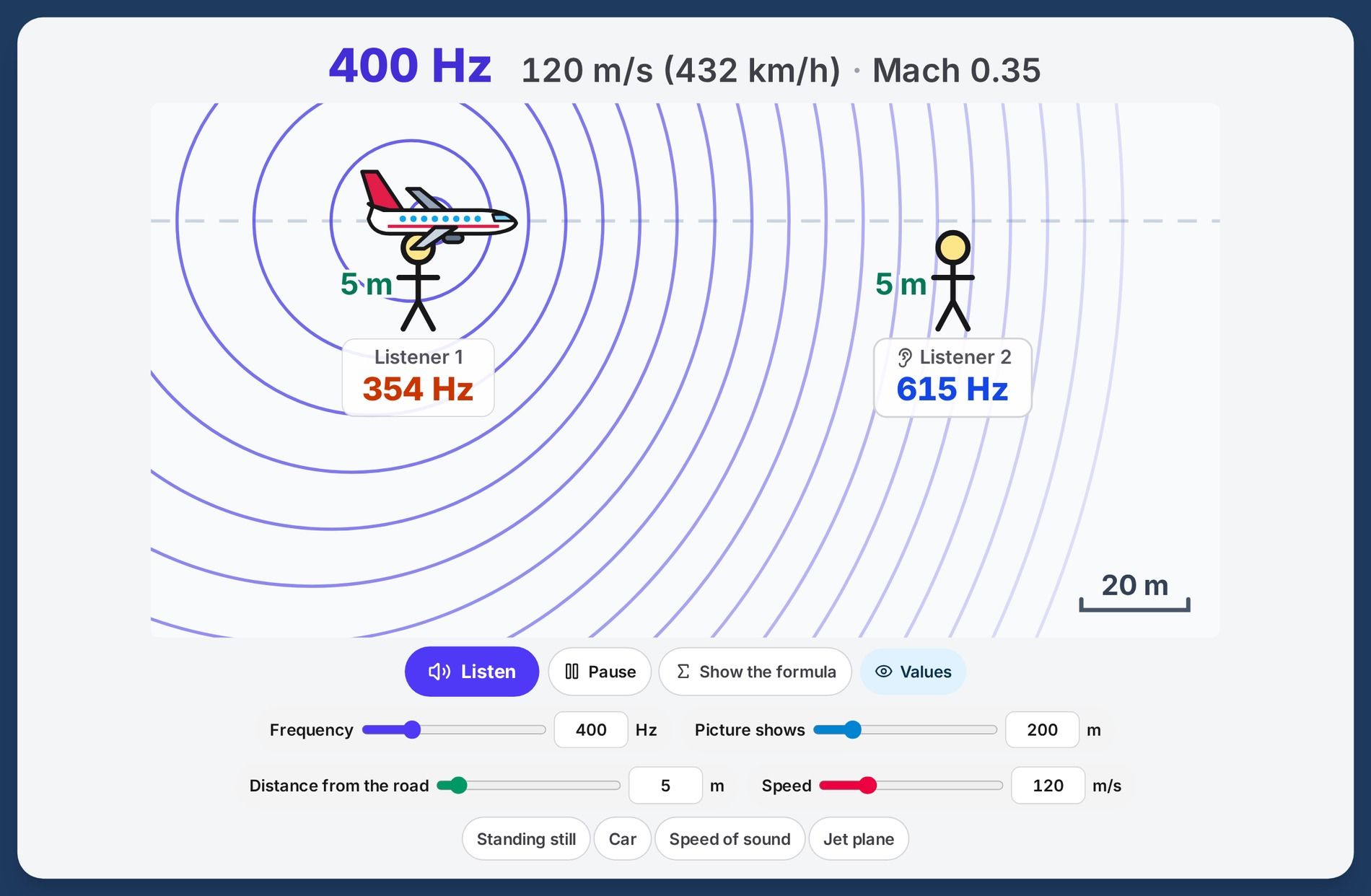
Tone and speed
The frequency goes from 200 to 1000 Hz and the speed from standing still up to 500 m/s. Quick choices for a car, the speed of sound and a jet plane are there, and the speed is also shown in km/h and as Mach. Faster than 250 km/h the source becomes an airplane.
How much road the picture shows
Choose how many metres the picture shows, from 20 to 1000 m. A car at 30 m/s shows clearly on 40 m, a jet plane needs a few hundred. A scale bar in the corner shows the length.
What the listeners hear
A listener stands on each side of the road, as far from it as you choose. The number under each listener shows the frequency reaching them right now: higher while the source comes closer, lower as it moves away. Right beside the road the pitch jumps as the source passes. Further away it glides.
The formula with numbers
Show the formula f′ = f · v / (v − vₛ) ahead and f′ = f · v / (v + vₛ) behind, with the class's values filled in and a speed of sound of 343 m/s. Hide the values so the class works them out first.
Sonic boom
At the speed of sound the waves pile up. Faster than sound a cone forms behind the source, and when it reaches a listener a short bang is heard.
Ways to use it
- Hide the values and let the class work out what the listener ahead hears before you show it.
- Press Car, then Jet plane, and ask what happens to the waves ahead of the source.
- Press Listen with the speed at zero and then at 100 m/s and let the class describe the difference.
How to get started
- Add Doppler effect.
- Drag the speed and watch the waves bunch up ahead of the source.
- Press Listen and hear the pitch drop as the source passes the listener.
Everything is on the same board: lesson schedule, timer, mini whiteboards and the other tools. No student accounts, and boards and images are stored in Sweden, under GDPR.
Questions
Where does the sound come from?
From the computer where you press Listen, so connect it to the classroom speakers. The projector shows the picture but makes no sound of its own.
Does it start playing on its own?
No. The sound only starts when you press Listen, at a low volume and with soft transitions.
Can students try it themselves?
Yes. With the student code a student can press Try it yourself and change the tone and speed on their own device. Nothing is sent to the board.
Does it work without motion?
Yes. With reduced motion switched on, the waves are shown as a still picture that is redrawn when you change something.
Missing something? We build what teachers ask for.
Tell us what you miss on the board or what is awkward. We read everything and reply.
Used in the lesson together with
- OscillatorA tone generator with the wave drawn on the board. Change frequency and amplitude, hear the tone through the speakers and see wavelength and period worked out.
- Lenses and mirrorsShow ray diagrams for converging and diverging lenses and concave, convex and plane mirrors. Move the object, change the focal length and see where the image forms, or hide it and let the class answer.
- CircuitBuild circuit diagrams with the textbook symbols: wire, battery, lamp, switch and resistor. The lamps light when the circuit is closed, brighter or dimmer in series and parallel.
Plan the whole lesson on the same board
Put the tool where it belongs in the lesson, next to the lesson schedule and the timer. The next lesson in the series is one click away.