
Times-table test
Times-table tests without paper and pencil
Choose the tables, the number of questions and the time. Students type on a tablet or computer, and when the test is over it is already scored.
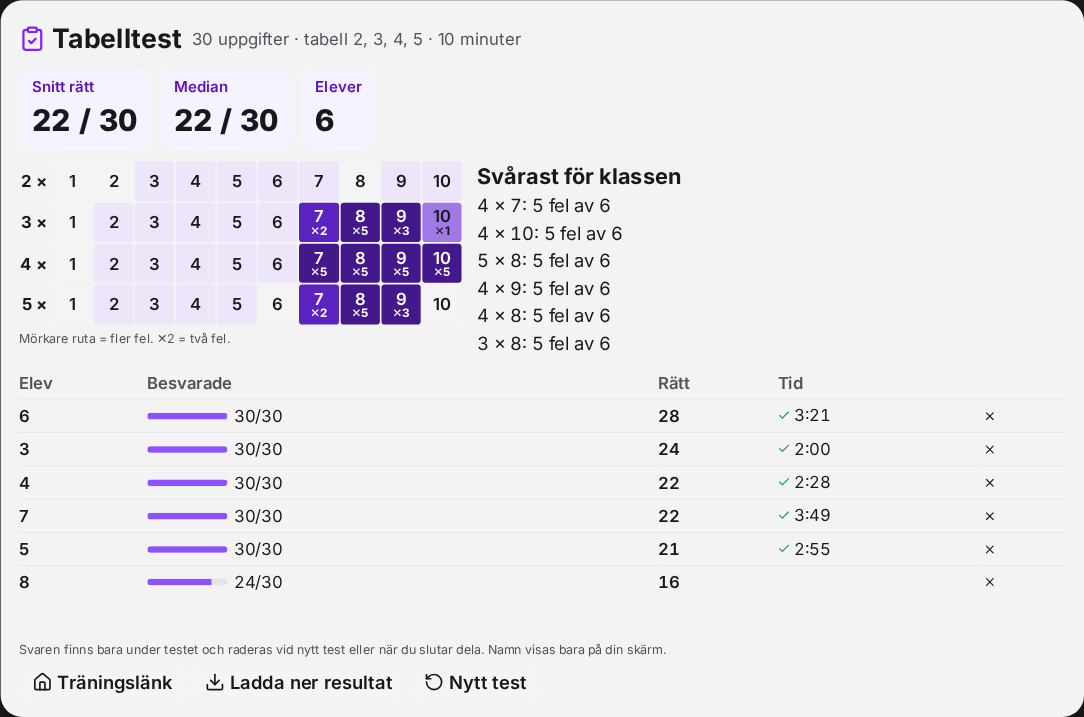
Scored instantly
You see how many have handed in while the test runs. Afterwards you get the class average and median, each student's score and time, and correct and wrong answers per table.
See which facts are hardest
Pekpinne shows the facts the class got wrong most often, such as 7 × 8. Then you know what the next walkthrough should be about. Download the results and open them in Excel.
Names only on your screen
Students type their number from the class list. If you like, connect a class list so the names show, but only on your computer. Pekpinne only holds the names encrypted.
These were wrong
When the test is over, each student sees on their own device which facts went wrong. With Practise them, just those facts come twice each, without a clock, so the student practises what is needed.
Practise at home with a code
Send families a six-digit code or a QR code with the same tables as the test. Students see at once if an answer is right and can practise the hard facts more. No account, and nothing is stored with us.
Ways to use it
- A short times-table test every Friday, scored before the bell rings.
- Start the next lesson with the facts the class got wrong most often.
- Send the practice code home with the same tables as the test.
How to get started
- Add the Times-table test widget and choose tables, number of questions and time.
- Share the board. Students type the code and their number.
- Press Start test and see the results when everyone has handed in.
Everything is on the same board: lesson schedule, timer, mini whiteboards and the other tools. No student accounts, and boards and images are stored in Sweden, under GDPR.
Questions
Which tables can I choose?
You choose which times tables are included, how many questions the test has and how long students get, or no time limit.
Do students see their result?
If you want. You decide whether students see their result when they hand in.
Are the results stored with you?
No. The answers exist only during the test and are deleted with a new test or when you stop sharing. Download the results if you want to keep them.
Missing something? We build what teachers ask for.
Tell us what you miss on the board or what is awkward. We read everything and reply.
Used in the lesson together with
- Mini whiteboardsDigital mini whiteboards: every student draws an answer on a tablet or computer and you see all answers live. You choose when the class sees them.
- Visual timerA large visual timer seen from the back of the classroom. Count down a work session, the whole lesson or the time until break, with work mode and sound.
- Link + QRShow a link as a large QR code on the board, for example to a form or a quiz. The QR code is made right in the browser.
Plan the whole lesson on the same board
Put the tool where it belongs in the lesson, next to the lesson schedule and the timer. The next lesson in the series is one click away.