
Map practice
Practise maps, area by area
Pick a ready list and students practise on the map on their own devices: click the province, name the country, its capital or its flag. What went wrong comes back until it sticks.
On the board
The whole class together: you ask, the class answers and the map shows the answer.
Each student
Students practise on their own devices in the lesson, and at home with a link.
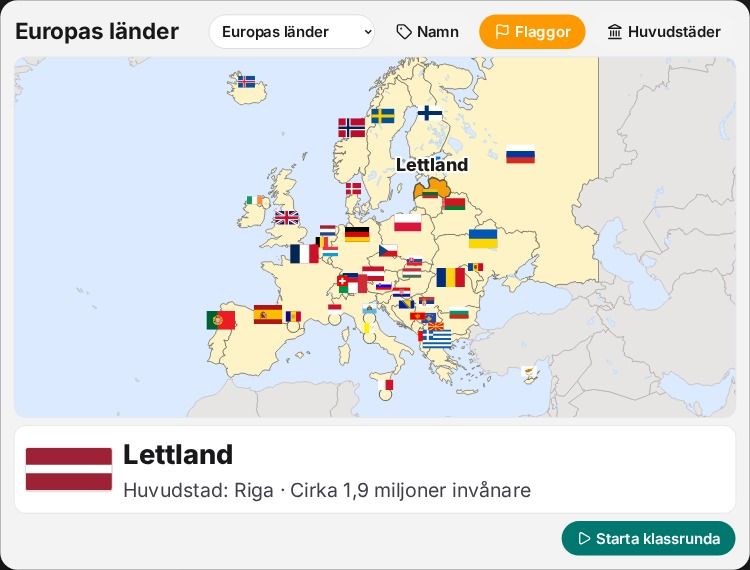
Ready lists
Sweden’s 25 provinces, Sweden’s 21 counties with their county seats, the Nordic countries, Europe’s 46 countries and Europe’s capitals. The list is saved in Study lists and you can remove what you are not studying right now.
Click, name, capital or flag
Click on the map is the default. Students can also name the place, answer with the capital, recognise the flag or try a blank map without names. Everything is free to choose, and the next step is suggested when a student knows a part.
Area by area
A few places at a time that lie close together, and the map zooms in on them. First the student sees where a place is, then picks among a few, and finally finds it on the whole map or writes the name.
Mistakes come back
After a mistake the right place is shown with its neighbours, for example that Latvia lies between Estonia and Lithuania, and the place comes back after a few others. After a right answer without help the app asks if the student was sure or guessed.
The map on the board
The Map widget shows the same maps to the whole class. Show or hide names, flags and capitals, tap a place and ask the class, or run a class round towards the class’s own goal.
Practise in Focus mode
Turn on Focus mode when you share the practice with the class. Students stay on the practice and you see at once if someone leaves the page.
Ways to use it
- Start with the Nordic countries, then Sweden’s provinces and counties.
- Run a class round on the board before students practise on their own.
- Send the practise at home link the week before a test on Europe.
How to get started
- Add a Study list and choose Map practice.
- Pick a list, for example Sweden’s provinces.
- Press Share with students or send the link to practise at home.
Everything is on the same board: lesson schedule, timer, mini whiteboards and the other tools. No student accounts, and boards and images are stored in Sweden, under GDPR.
Questions
Do students need accounts?
No. Students join with the class code or the link and type a number or a first name that only your computer can read.
What do I see as the teacher?
How many places each student knows and which places the class misses most, while you practise. No leaderboards and no competition between students.
Does it work with Focus mode?
Yes. Map practice runs in Pekpinne, so Focus mode sees if a student leaves the page, as in other practice.
Where do the maps and flags come from?
The maps are built from open data from Natural Earth, Lantmäteriet and Statistics Sweden. The flags are in the public domain, from Wikimedia Commons.
Is anything saved about the students?
What a student knows is saved only in the student’s own browser. You only get counts and which places were missed, and that is gone when you clear it or after twelve hours.
Missing something? We build what teachers ask for.
Tell us what you miss on the board or what is awkward. We read everything and reply.
Used in the lesson together with
- Flag practicePractise flags of Europe and the Nordic countries: pick the country among four names, then write it. Like a flags quiz, but students actually learn them.
- Arms, animals and flowers of the provincesPractise the 25 provinces of Sweden with their coats of arms, provincial animals and provincial flowers. Pick the province among four, write it or find it on the map.
- Study listMake the week’s vocabulary list once. Students practise on their own devices in class and at home without an account, and the word test is scored at once.
Plan the whole lesson on the same board
Put the tool where it belongs in the lesson, next to the lesson schedule and the timer. The next lesson in the series is one click away.