
Place value chart
Place value chart on the board: decimals, × 10 and units
Type 3405.07 and every digit lands under its place. Press × 10 or ÷ 10 and watch the digits slide while the decimal point stays. Switch to units and move the point from metres to centimetres.
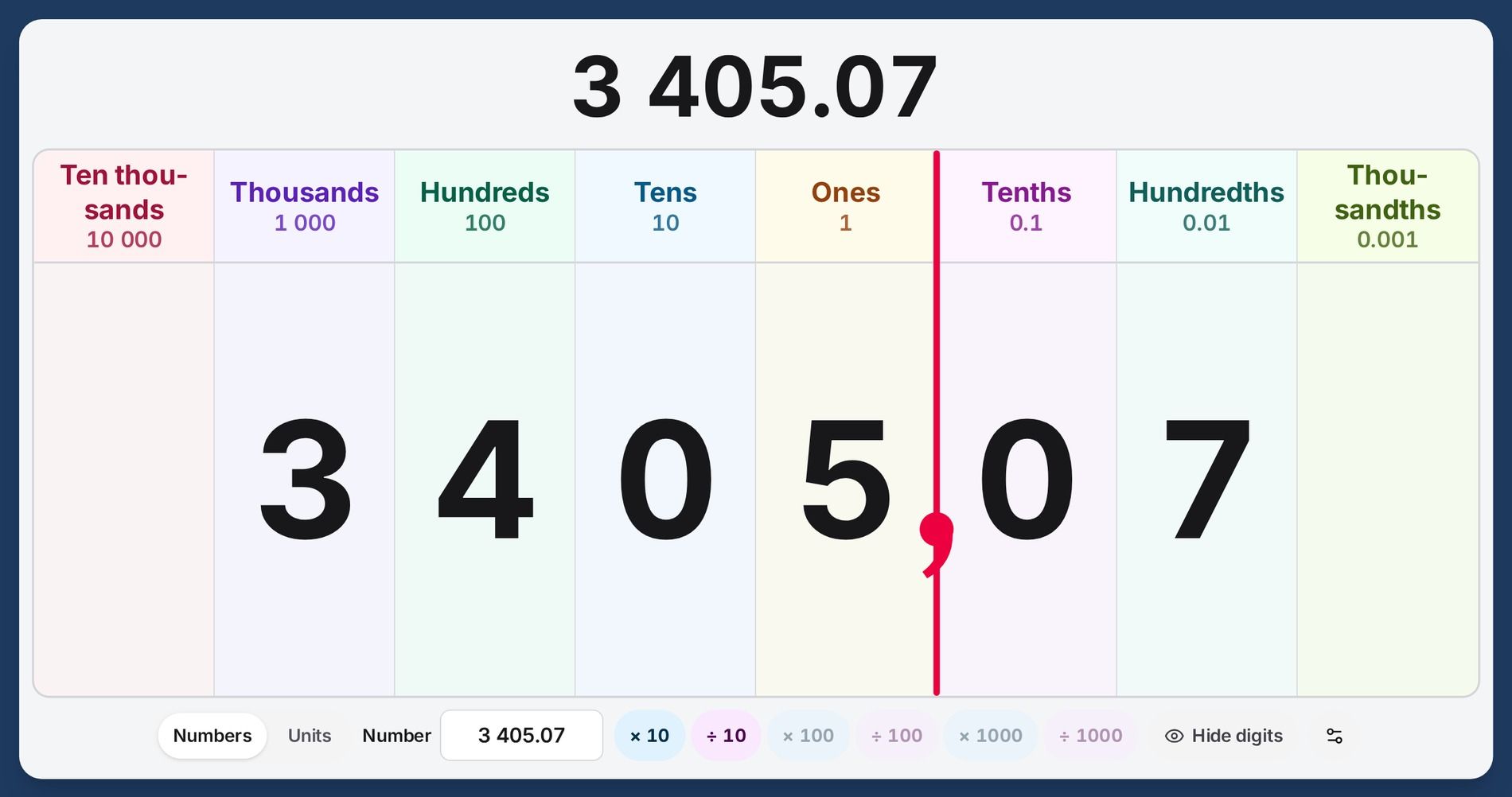
Ten thousands to thousandths
The columns show their name and value (100, 10, 1, 0.1) in the same colours as Base ten blocks. The decimal point is a clear red line between ones and tenths. Hide columns at either end, for example only ones to thousands for younger classes.
Times and divided by 10, 100 and 1000
The digits slide left or right while the point stays, and the board shows 3405.07 × 10 = 34050.7. A button turns grey when a digit would no longer fit in the chart.
Convert units step by step
Length (km hm dam m dm cm mm), mass (kg hg dag g dg cg mg, tonnes if you like) and volume (kl hl dal l dl cl ml). Type 2.5 m, pick cm and press One step: 2.5 m = 25 dm = 250 cm. The zeros that are filled in have their own colour.
The class answers first
Hide the digits and ask which digit is in the tens place. Tap a box to show just that digit. In units, the zeros the conversion adds are hidden.
Ways to use it
- Hide the digits, type 3405.07 and ask what the 0 between 4 and 5 means.
- Show 0.5 and press × 10 three times: what happens to the point?
- Convert 350 g to kg one step at a time and let the class say the next step first.
How to get started
- Add Place value chart.
- Type a number, or choose Units and type for example 2.5 m.
- Press × 10 or ÷ 10, or One step towards the unit you are converting to.
Everything is on the same board: lesson schedule, timer, mini whiteboards and the other tools. No student accounts, and boards and images are stored in Sweden, under GDPR.
Questions
Are there rounding errors with decimals?
No. Pekpinne works with the digits, not with approximate decimal numbers, so 0.07 × 100 is exactly 7.
Why are dam, dag and dal there?
They are rarely used but make every step in the chart times 10. Then the class sees the point move one place per unit.
Can students try it themselves?
Yes. With the student code a student presses Try it yourself and can type their own numbers and convert on their screen. Nothing is sent to the board.
Missing something? We build what teachers ask for.
Tell us what you miss on the board or what is awkward. We read everything and reply.
Used in the lesson together with
- Base ten blocksShow numbers with base ten blocks on the board. Add blocks, exchange ten ones for a ten and hide the number so the class answers first.
- Unit sprintUnit conversion at a brisk pace for the whole class: 2 dl = ? l, 250 g = ? kg, force = ? newton. Choose length, volume, mass or SI units, how long and when the answer shows.
- Number lineA number line on the board with the numbers you choose and as many parts per whole as you like, as fractions or decimals. Tap to mark a number.
Plan the whole lesson on the same board
Put the tool where it belongs in the lesson, next to the lesson schedule and the timer. The next lesson in the series is one click away.