
Typing practice
Teach the class to type with ten fingers
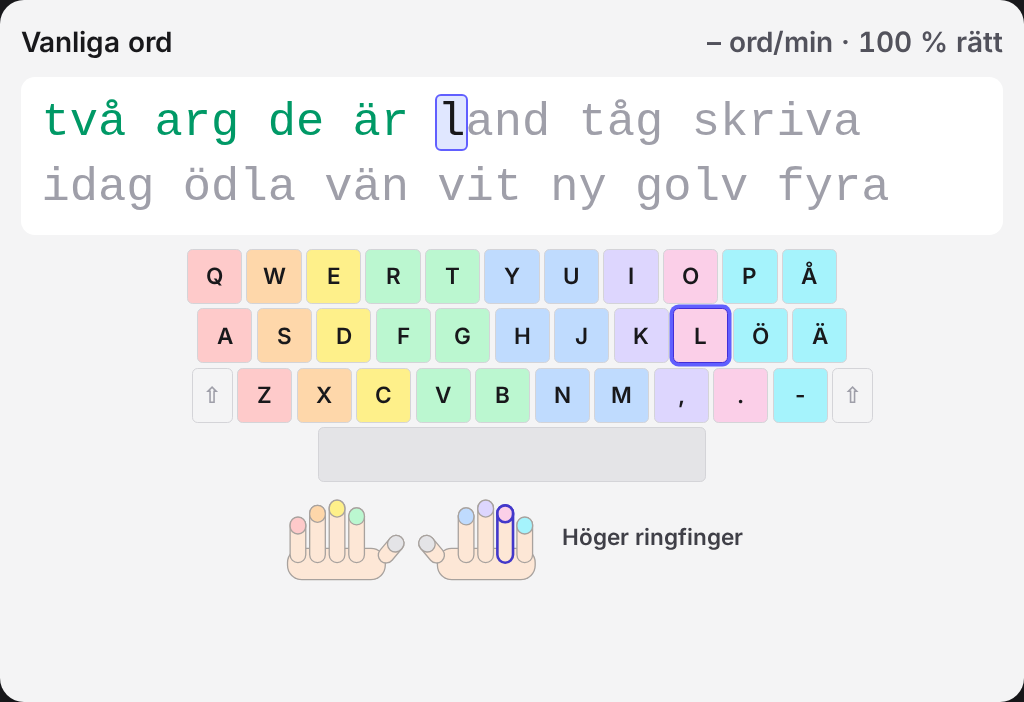
Choose the level and time on the board. Students type in the student code and start typing. The next key lights up on a keyboard, in the colour of the finger that presses it.
Level by level
Home row, whole middle row, with the top row, with the bottom row, common words and whole sentences, or the top or bottom row by itself. The text uses only letters the students have practised, with real words as soon as possible.
The right finger
Each finger has its colour, on the keyboard and on the fingertips of two hands below it. The next key is marked and the finger to press it lights up. A wrong key stays until the right one comes.
Swedish or English
Choose Swedish or English words and sentences, for Swedish lessons or English.
Points against yourself
After the round: words per minute, how much was right first time, and points that weigh both, so rushing doesn’t pay. Students compare with their own last round. Choose 30 seconds to 10 minutes, your own time or no limit.
A class goal, no ranking
While you share the board it shows the Class goal: how many characters the whole class has typed right together, how many have typed and how many beat their own record. No names and no ranking, so everyone adds to it. The numbers reset with Start over or when you stop sharing.
Ways to use it
- Five minutes of typing at the start of every lesson in the computer room.
- Move up a level only when most of the class has 95 % right.
- Use the sentences level before a writing task.
How to get started
- Add Typing practice.
- Choose the level and time.
- Share the student code. Students type on their own computer.
Everything is on the same board: lesson schedule, timer, mini whiteboards and the other tools. No student accounts, and boards and images are stored in Sweden, under GDPR.
Questions
Does it work on Chromebooks and iPads with a keyboard?
Yes, on any computer with a Swedish keyboard, å, ä and ö included.
Do I see the students’ results?
Not one by one. You see the Class goal for the whole class, and each student sees their own result. No names are saved.
Can students practise at home?
Yes. Press Practise at home for a link and a code at the same level. No account is needed and the best result is only saved on the student’s own computer.
Missing something? We build what teachers ask for.
Tell us what you miss on the board or what is awkward. We read everything and reply.
Used in the lesson together with
- Maths sprintTimes-table questions from the tables you choose, one at a time on the board. The answer shows after a moment or when you tap.
- Match upType concepts and explanations and the explanations are shuffled. Students connect them on the board or on their own device.
- Mini whiteboardsDigital mini whiteboards: every student draws an answer on a tablet or computer and you see all answers live. You choose when the class sees them.
Plan the whole lesson on the same board
Put the tool where it belongs in the lesson, next to the lesson schedule and the timer. The next lesson in the series is one click away.